





 App Store
 Steam
SteamUnity3D 实现原始方式获取连拍照片
今天为大家分享一下,如何在unity利用原始方式实现获取连拍照片,甚至我们可以把一系列图片的利用一些视频软件后期合成视频。
但是直接在用代码利用这一系列图片合成视频,这种方式还是不推荐的,毕竟效率很低下,如果需要实现录屏功能,ShareREC便是一个比较好的选择。
好吧!废话不多讲,我们直接进入主题噢!
1.新建一个unity项目,并且在项目中新建Editor文件夹,首先我们先实现一个编辑器,在文件夹下有一个CapResRecorder_Editor.cs;
代码如下:
复制代码
2.这一步稍微比较重要,正是生成系列图片的逻辑代码类CapResRecorder.cs;
代码如下:
复制代码
3.然后我们发现在GameObject下面有一个选项,我们可以直接点击创建一个CapResRecorder对象;
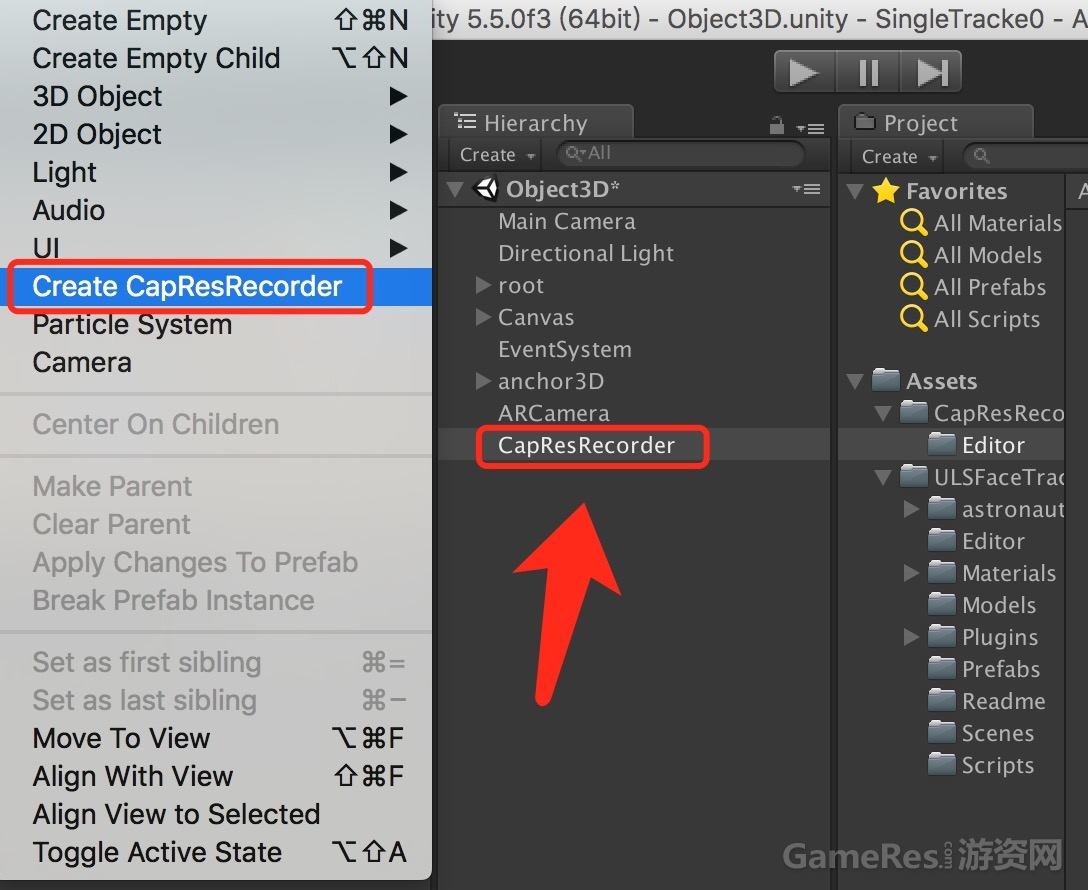
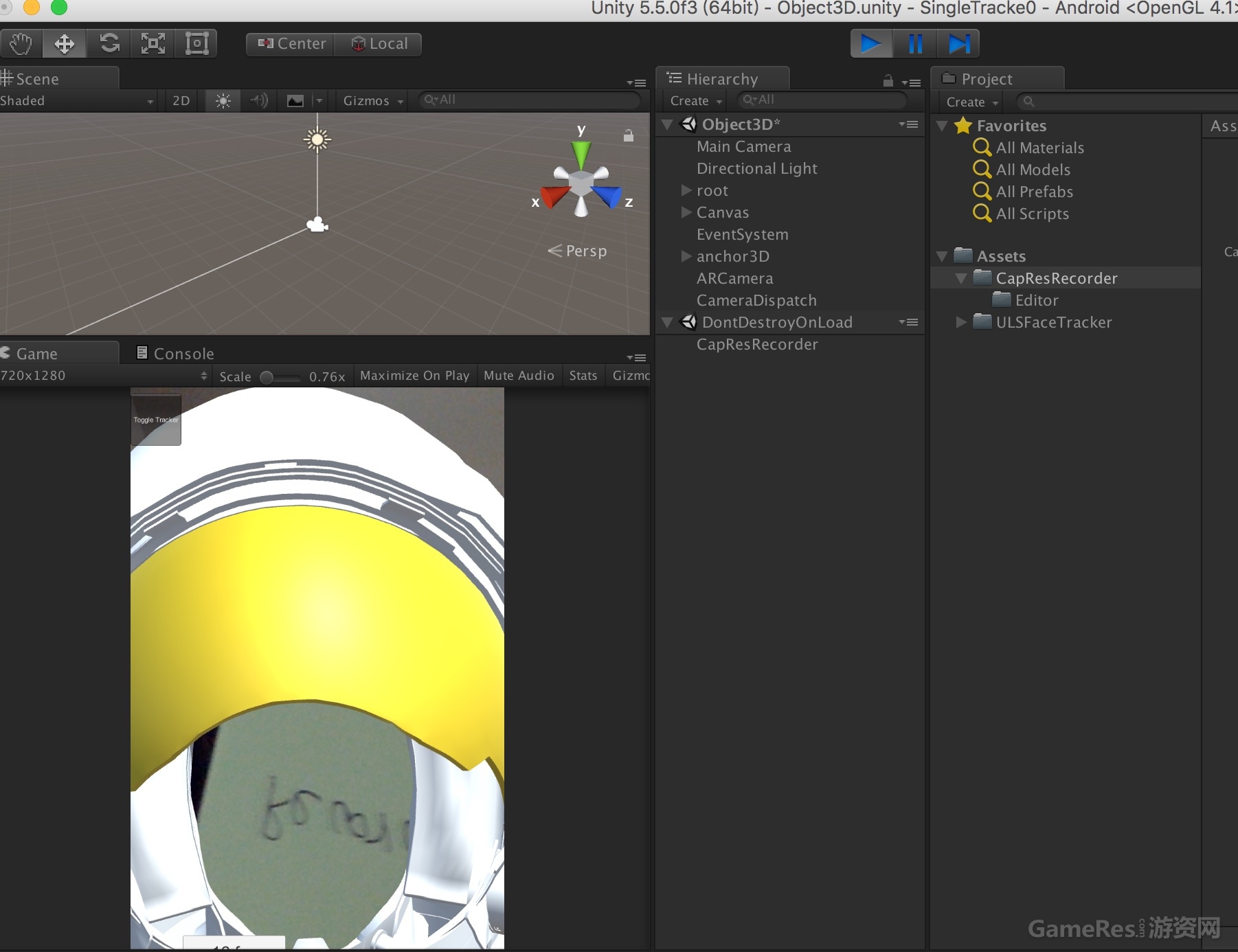
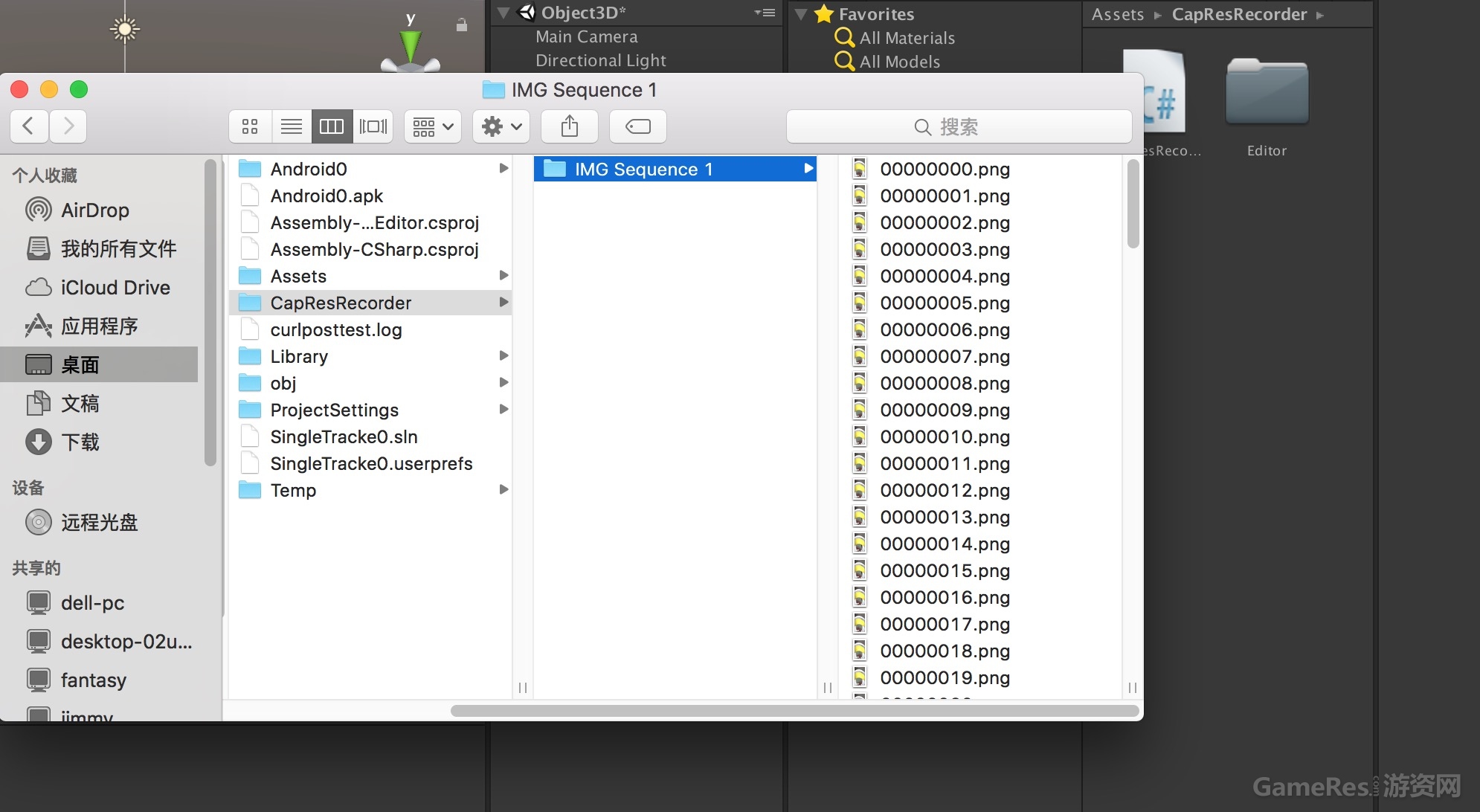
4.最后我们直接运行项目,就得到一系列的截图啦!
学习交流群:575561285
但是直接在用代码利用这一系列图片合成视频,这种方式还是不推荐的,毕竟效率很低下,如果需要实现录屏功能,ShareREC便是一个比较好的选择。
好吧!废话不多讲,我们直接进入主题噢!
1.新建一个unity项目,并且在项目中新建Editor文件夹,首先我们先实现一个编辑器,在文件夹下有一个CapResRecorder_Editor.cs;
代码如下:
- using UnityEngine;
- using System.Collections;
- using UnityEditor;
- public class CapResRecorder_Editor {
- [MenuItem("GameObject/Create CapResRecorder", false,10)]
- public static void CreateHiResRecorder(MenuCommand menuCommand) {
- CapResRecorder recorder = Object.FindObjectOfType<CapResRecorder>();
- if (recorder) {
- Debug.LogWarning("An instance of CapResRecorder already exists!");
- Selection.activeObject = recorder.gameObject;
- } else {
-
- GameObject go = new GameObject("CapResRecorder");
- go.AddComponent<CapResRecorder>();
- GameObjectUtility.SetParentAndAlign(go, menuCommand.context as GameObject);
- Undo.RegisterCreatedObjectUndo(go, "Create " + go.name);
- Selection.activeObject = go;
-
- }
- }
- }
2.这一步稍微比较重要,正是生成系列图片的逻辑代码类CapResRecorder.cs;
代码如下:
- using UnityEngine;
- using System.Collections;
- using System.IO;
- public class CapResRecorder : MonoBehaviour {
-
- public KeyCode key = KeyCode.A;
- public int frameRate = 30;
-
- bool isCapturing = false;
- string prefix,path;
- int folderIndex = 0;
- int imgIndex = 0;
- float localDeltaTime,prevTime,fixedDeltaTimeCache;
-
- void Start () {
- DontDestroyOnLoad(this.gameObject);
- fixedDeltaTimeCache = Time.fixedDeltaTime;
- if (Application.isEditor)
- prefix = Application.dataPath+"/../CapResRecorder/";
- else
- prefix = Application.dataPath+"/CapResRecorder/";
- Debug.Log("IMG sequence will be saved to "+prefix);
- }
-
-
- void LateUpdate () {
-
- localDeltaTime = Time.realtimeSinceStartup - prevTime;
- prevTime = Time.realtimeSinceStartup;
-
- if (Input.GetKeyDown(key)) {
- isCapturing = !isCapturing;
- if (isCapturing) {
- folderIndex+=1;
- imgIndex = 0;
- path = prefix+"IMG Sequence "+folderIndex;
- if (Directory.Exists(path)==false)
- Directory.CreateDirectory(path);
- path = path + "/";
-
- } else {
- Time.timeScale = 1f;
- //Time.fixedDeltaTime = fixedDeltaTimeCache;
- }
- }
- if (isCapturing){
- Application.CaptureScreenshot(path+imgIndex.ToString("D8")+".png");
- imgIndex+=1;
- Time.timeScale = 1.0f/localDeltaTime/frameRate;
- //Time.fixedDeltaTime = fixedDeltaTimeCache / Time.timeScale;
- }
- }
- }
3.然后我们发现在GameObject下面有一个选项,我们可以直接点击创建一个CapResRecorder对象;
4.最后我们直接运行项目,就得到一系列的截图啦!
学习交流群:575561285
评论
登录 后参与讨论
暂无评论,来抢沙发






 闽公网安备 35020302034348号